 Fonti
FontiYour Brand Name
Hello World
Bubble text puts every letter inside its own circle, and the result pastes into a bio, a username or a message without the shape being stripped out.
Style: Bold Script
Your Brand Name
Hello World
Hello World
Hello World
No favourites yet. Tap the star on a card to save it.
Nothing copied yet.
Nothing matches that search.
Numbers stay plain.
characters
Pick an alphabet, a separator and a decoration, then copy the result.
Live preview
0 units
Ⓒⓘⓡⓒⓛⓔⓓ
Unicode records the circled capital M at U+24C2 as an emoji character.
⒫⒜⒭⒠⒩⒯⒣⒠⒮⒤⒵⒠⒟
Numbers stay plain.
Capitals fold to lowercase
🄟🄐🄡🄔🄝🄣🄗🄔🄢🄘🄩🄔🄓 🄒🄐🄟🄢
Numbers stay plain.
Lowercase folds to capitals
🅕🅘🅛🅛🅔🅓 🅒🅘🅡🅒🅛🅔🅓
Lowercase folds to capitals
🅂🅀🅄🄰🅁🄴🄳
Numbers stay plain.
Unicode's squared letters are capitals only, so lowercase letters appear as squared capitals.
🅵🅸🅻🅻🅴🅳 🆂🆀🆄🅰🆁🅴🅳
Numbers stay plain.
Lowercase folds to capitals
Unicode lists U+1F170, U+1F171, U+1F17E and U+1F17F as emoji characters.
Marks added over your text, letters unchanged.
An alphabet wrapped in a decoration.
Decoration wrapped around your text, letters unchanged.
Decoration wrapped around your text, letters unchanged.
Decoration wrapped around your text, letters unchanged.
Decoration wrapped around your text, letters unchanged.
Decoration wrapped around your text, letters unchanged.
Decoration wrapped around your text, letters unchanged.
This bubble text generator is free, needs no account, and behaves the same on a phone as it does on a desktop. The useful thing to know up front is that nothing is being styled here. Each bubble letter is a separate character that Unicode drew with the circle already attached, which is why it survives a copy and paste when bold and italic do not.
The whole thing takes about fifteen seconds. Type your words, pick a style, copy, then check the result in the place you actually plan to use it. That last step is the one most people skip, and it is the only one that catches a problem before other people see it.
Put your words in the input box at the top of the page. Capitals, lowercase, numbers and spaces all work, and you do not need to clear the box between attempts. If you are styling a username, type it exactly as it appears now, including any full stops or underscores, so you can compare the two side by side. Long text is fine, though bubble letters get harder to read past a few words.
Every style updates live as you type, so you can see all of them before choosing. The outlined circles are the safest choice and the filled ones have the strongest visual punch. Look closer at the filled styles before you settle on one, because they only cover capital letters, and any lowercase you typed will quietly come out as capitals. The next section explains why that happens.
Tap or click the copy button beside the style you want. Dragging to select works, but on mobile it often grabs a trailing space or misses the last character, and a missing last character is easy to miss in a small font. The button copies the exact string every time. Nothing is stored and nothing is sent anywhere, because the conversion happens in your browser.
Paste into the real field before you save. Instagram bios, Discord nicknames and TikTok display names each treat these characters slightly differently, and a style that looks perfect here can render as empty boxes on someone else’s device. Test this one on a phone if you own one, since phone fonts and desktop fonts are not the same. Thirty seconds of checking beats finding out from a friend that your name shows up as squares.
Most generators hand you a row of bubble styles and let you assume they all work the same way. They do not. There are five separate enclosed alphabets in Unicode, they were added seventeen years apart, and only one of them covers the full alphabet in a place your device is likely to have. Knowing which is which saves you from a broken username.
This is the classic look, ⑤⑥⑦ in lowercase and ⒶⒷⒸ in capitals. It arrived in Unicode 1.1 in June 1993, built for numbered lists and reference marks in technical documents rather than for anything decorative. Because it is that old, it ships in almost every system font on almost every device. Bear in mind that one single letter in this set behaves oddly, capital M, and section 5 explains why.
These are the solid filled circles, 🅐🅑🅒, and they carry far more weight on a busy feed. They came much later, in Unicode 6.0 in October 2010, as part of a block called Enclosed Alphanumeric Supplement. Catch here: there is no lowercase version anywhere in the standard, so a filled style can only ever give you capitals. Type a lowercase word and the letters fall back to capitals without any warning.
Bracketed letters like ⒜⒝⒞ exist because a list marker sometimes has to be a real character rather than something the layout draws for you. The lowercase set sits next door to the circled letters and dates from 1993, so it is just as safe. The capitals do exist, which surprises most people, but they were added later in a completely separate range in a different part of Unicode. That split is the reason bracketed lowercase renders everywhere while bracketed capitals sit in a later range.
The boxed styles, 🄰 outlined and 🅰 filled, get bundled with bubble text on nearly every competing tool. They are capitals only, they have no digits at all, and they are squares rather than circles. If a box is what you want, you can fill the letters instead with the aesthetic font generator, which is where that whole family lives. One exception is worth flagging: four of the filled squares are not really letters any more, and that is section 5 again.
There is a way around the missing lowercase, and no other bubble tool mentions it. Unicode has a character called a combining enclosing circle, which draws a circle around whatever character comes immediately before it, so in theory you can circle any letter you like. Not universal, though: support for combining marks is patchy, and the circle often lands off-centre or overlaps the letter. Treat it as a curiosity rather than something to put in a username.
Here is the full circled alphabet, since that is the set worth using. Each character is a single code point, not a letter with something added to it, which is why you can paste it anywhere plain text is allowed.
| Letter | Circled small | Circled capital | Bracketed small |
|---|---|---|---|
| a | ⓐ | Ⓐ | ⒜ |
| b | ⓑ | Ⓑ | ⒝ |
| c | ⓒ | Ⓒ | ⒞ |
| d | ⓓ | Ⓓ | ⒟ |
| e | ⓔ | Ⓔ | ⒠ |
| f | ⓕ | Ⓕ | ⒡ |
| g | ⓖ | Ⓖ | ⒢ |
| h | ⓗ | Ⓗ | ⒣ |
| i | ⓘ | Ⓘ | ⒤ |
| j | ⓙ | Ⓙ | ⒥ |
| k | ⓚ | Ⓚ | ⒦ |
| l | ⓛ | Ⓛ | ⒧ |
| m | ⓜ | Ⓜ | ⒨ |
| n | ⓝ | Ⓝ | ⒩ |
| o | ⓞ | Ⓞ | ⒪ |
| p | ⓟ | Ⓟ | ⒫ |
| q | ⓠ | Ⓠ | ⒬ |
| r | ⓡ | Ⓡ | ⒭ |
| s | ⓢ | Ⓢ | ⒮ |
| t | ⓣ | Ⓣ | ⒯ |
| u | ⓤ | Ⓤ | ⒰ |
| v | ⓥ | Ⓥ | ⒱ |
| w | ⓦ | Ⓦ | ⒲ |
| x | ⓧ | Ⓧ | ⒳ |
| y | ⓨ | Ⓨ | ⒴ |
| z | ⓩ | Ⓩ | ⒵ |
All three of those columns come from the same block, called Enclosed Alphanumerics, which runs from U+2460 to U+24FF. The circled capitals begin at U+24B6, the circled lowercase at U+24D0, and the bracketed lowercase at U+249C. They were all part of Unicode 1.1, which is the version that shipped in June 1993, and that age is precisely why they are dependable.
The filled capitals live somewhere else entirely, running from U+1F150 to U+1F169. That range belongs to a block added in Unicode 6.0 in October 2010, seventeen years after the circled letters. Before you commit to a filled style, it helps to know that the gap in age is a gap in support too, because a font has to be updated to include newer characters and plenty never were.
The two capitals-only alphabets are listed separately below, since neither has a lowercase form to sit beside. Bracketed capitals begin at U+1F110, which is a useful thing to know if you ever need to check one: count twenty places along and you land on U+1F124, the bracketed U.
| Letter | Filled circle | Bracketed capital |
|---|---|---|
| A | 🅐 | 🄐 |
| B | 🅑 | 🄑 |
| C | 🅒 | 🄒 |
| D | 🅓 | 🄓 |
| E | 🅔 | 🄔 |
| F | 🅕 | 🄕 |
| G | 🅖 | 🄖 |
| H | 🅗 | 🄗 |
| I | 🅘 | 🄘 |
| J | 🅙 | 🄙 |
| K | 🅚 | 🄚 |
| L | 🅛 | 🄛 |
| M | 🅜 | 🄜 |
| N | 🅝 | 🄝 |
| O | 🅞 | 🄞 |
| P | 🅟 | 🄟 |
| Q | 🅠 | 🄠 |
| R | 🅡 | 🄡 |
| S | 🅢 | 🄢 |
| T | 🅣 | 🄣 |
| U | 🅤 | 🄤 |
| V | 🅥 | 🄥 |
| W | 🅦 | 🄦 |
| X | 🅧 | 🄧 |
| Y | 🅨 | 🄨 |
| Z | 🅩 | 🄩 |
If either column shows as blank boxes on your screen right now, that is the compatibility problem this page keeps warning about, demonstrating itself.
Most styled alphabets give you letters and then quietly stop. Bubble text is the opposite. Circled digits were part of that same 1993 block, and they run well past the ten digits on your keyboard, which makes this the one decorative style where numbers are a strength rather than an apology.
| Set | Characters |
|---|---|
| Circled, zero to twenty | ⓪ ① ② ③ ④ ⑤ ⑥ ⑦ ⑧ ⑨ ⑩ ⑪ ⑫ ⑬ ⑭ ⑮ ⑯ ⑰ ⑱ ⑲ ⑳ |
| Bracketed, one to twenty | ⑴ ⑵ ⑶ ⑷ ⑸ ⑹ ⑺ ⑻ ⑼ ⑽ ⑾ ⑿ ⒀ ⒁ ⒂ ⒃ ⒄ ⒅ ⒆ ⒇ |
| Filled circled, zero to ten | ⓿ ❶ ❷ ❸ ❹ ❺ ❻ ❼ ❽ ❾ ❿ |
The basic set covers zero through nine, and then it keeps going. Circled numbers continue through the teens and into the twenties and thirties, held in a separate block originally built for Chinese and Japanese typesetting. On one current Android, 10, 15 and 20 rendered as circled numbers. Small print: the higher numbers came from a different tradition than the letters did, so a font that draws a circled ⑤ beautifully may have nothing at all for a circled thirty. Stick to single digits for anything permanent.
Bracketed digits exist too, running from one upward, and there is one odd gap in the standard. There is no bracketed zero anywhere in Unicode. A (0) has to stay plain, which is a strange thing to discover halfway through styling a date. Filled circled digits are also available, though they were catalogued as decorative dingbats rather than as part of the alphabet, along with a rarely used double-circled set.
Compare that to the other styles on this site. Script and cursive letters have no digits at all, because the block they come from was built for mathematics and mathematicians already had numerals. Gothic has none either. If you want numbers that match the rest of your text rather than circles, you can number every line with the number font generator.
Here is the thing no other bubble page tells you. Five of these characters are not treated as letters by modern phones and apps. They are treated as emoji, which means the system draws them in colour, at emoji size, using its own artwork rather than your font. The letter you chose stops being a letter.
The worst affected style is the filled square. Unicode gave four of those characters an emoji presentation, and it did so because they had jobs before anyone used them decoratively. The standard’s own notes call 🅰 the blood type A sign and 🅾 the blood type O sign. 🅱 is the one most people have seen as a meme, and 🅿 is the international parking sign, which was granted emoji status back in Unicode 6.1 while the other three waited until version 8.0.
The practical effect is ugly. Write a word in filled squares and four of the twenty six letters may come out as coloured tiles while the rest stay flat and monochrome. Nobody reading it will assume your device did that. They will assume you picked a broken style.
The outlined circles are almost clean, with one exception in the whole alphabet. Capital M carries an emoji presentation as well, because it doubles as the metro and underground sign on transport maps. Write ⓂⓄⓂ in circled capitals and both Ms can arrive blue while the O stays black. It is one letter out of twenty six, so it only matters if your text contains an M, and plenty of names do.
There is a name for what is happening, and it is worth knowing because it explains a lot of odd behaviour in styled text. Unicode calls it emoji presentation, and there is an invisible character called a variation selector that can force a character to render as flat text instead of colourful emoji. Do test this before you commit: apps honour that request inconsistently, so the same string can be flat on a laptop and coloured on a phone.
Every competing generator files square letters under bubble text, and the confusion is understandable. Unicode itself hedges on this. The standard’s own description of the filled square range says the square edges may be slightly rounded, which is the body that defines these characters admitting the line is blurry.
So here is the line drawn plainly. Bubble means round: circles, filled circles and brackets. Squares are a different look with a different feel, closer to a vaporwave or retro aesthetic than to anything soft or bubbly. They also come with real limitations that the round styles do not have.
| Round bubble | Square | |
|---|---|---|
| Shape | Circles and brackets | Boxes |
| Lowercase | Yes, in the circled set | No, capitals only |
| Digits | Yes, past twenty | None |
| Age | 1993 for the core set | 2010 |
| Letters that turn into emoji | One, capital M | Four |
| Safe for a permanent username | The outlined circles, yes | Not recommended |
Careful with these if you are choosing for a bio you plan to leave up. The square styles fail on more counts than they win on, and the emoji problem alone can make a name unreadable for half the people who see it. If the boxed look is genuinely what you are after, that family is covered properly on the aesthetic page rather than here.
These two phrases get used as if they mean one thing, and the difference decides whether what you make will work. A font is a file. It lives on a device, it has to be installed there, and it only applies inside apps that let you choose fonts. Change the font of a word in a document and you have not changed the word at all, only the instructions for drawing it.
Bubble text works the other way round. The circle is baked into the character itself, so there is no instruction to lose. That is why you can paste it into a username field that offers no formatting options whatsoever and the circles still arrive. It is also why you cannot make it bigger, recolour it, or adjust the thickness of the circle, because none of that is yours to control.
| Bubble font | Bubble text | |
|---|---|---|
| What it is | A file you install | Characters you copy |
| Works in a bio or username | No | Yes |
| Survives copy and paste | No | Yes |
| You can resize and recolour it | Yes | No |
| Needs the reader to have anything | No, it is baked into an image | Yes, a font that covers the character |
| Best for | Posters, thumbnails, printing, logos | Bios, usernames, captions, chat |
One snag sits in that last row and it is the honest catch of the whole page. Because bubble text depends on the reader’s device having a font that covers the character, the result is never fully in your hands. A font file gives you total control and no portability. Characters give you total portability and no control.
Some people arrive here wanting something different: big outlined letters to colour in, or chunky rounded letters for a poster or a classroom display. That is a drawing, not text. These characters will not do it, and it is better to say so than to waste your time.
The circled characters here are the same size as ordinary letters and they always will be, because they are letters. You cannot enlarge them into an outline you can colour inside, and printing them gives you small circles on a page. Not always true of every use, though. If you only need a heading with a soft rounded feel, pasting circled capitals into a document at a large point size does look reasonably good.
For real printable bubble letters you want one of two things. Either a rounded or outline font file, set very large in a word processor or design tool, which gives you letters you can print and colour. Or a dedicated printable generator that produces a PDF of hollow letters sized for a page. Both of those are image and print tools rather than text tools, and neither has anything to do with Unicode.
Generic compatibility promises are useless, because the answer changes field by field inside the same app. What follows is the honest breakdown, including the places it will not work at all.
Instagram is the most common destination and it has one hard rule people learn too late. Usernames accept only letters, numbers, periods and underscores, so bubble characters are rejected outright there. The display name is a different field with no such restriction, which is where styled text belongs, and the bio allows 150 characters. If your bio is already close to that limit, remember that every bubble letter counts as its own character just like a plain one.
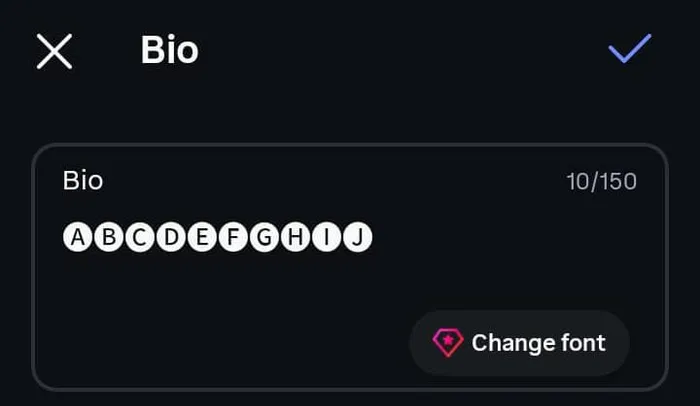
Ten filled circled capitals in the Instagram bio field, with the counter reading 10 of 150.
TikTok behaves similarly, with the styling going in the display name rather than the handle. An Android TikTok bio field showed 0/160. Watch the edges here: styled text in a bio is generally not searchable, so a name written entirely in circles can stop people finding you.
Discord is the friendliest platform for this. Usernames are restricted to 32 characters of plain ASCII, but display names and per-server nicknames both allow 32 characters with styling permitted, and the About Me field runs to 190. Server names, role names and channel names each cap at 100. You can name your server with the Discord fonts generator, which covers those fields in detail.
WhatsApp accepts these characters in the About line and in messages without complaint. Group names take them too. The main risk on chat apps is not rejection but rendering, since the person reading it may be on an older phone than yours.
Gaming is the strictest category and the rules vary wildly between titles. Many games run a filter that accepts only a narrow set of characters, and enclosed letters are often outside it. Others accept them at signup and then display them as boxes in-game, which is worse than a straight rejection because you cannot see the problem from your own screen.
Bubble text also turns up in spreadsheet headers, playlist titles, calendar event names, browser bookmarks and file names. Anywhere plain text is stored, these characters go too. The one place to avoid them completely is anything you or someone else will need to search for later, because a circled word and a plain word are different strings and no search box treats them as the same thing.
That empty rectangle has a name. Typographers call it tofu, because a blank white box is exactly what it looks like on a page. Google named its giant font family Noto for this reason, short for no tofu, and built it to cover every character in Unicode so the boxes would stop appearing.
When a box appears, the character arrived perfectly intact. What happened is that the font on the reader’s device has no drawing for it, so the system falls back to a placeholder to show that something is there. Your text is not corrupted and copying it again will not help. The same string can look flawless on your phone and blank on a laptop three years older.
Safest. Outlined circles and bracketed lowercase. Both date from 1993, both sit in the oldest and most widely supported part of Unicode, and system fonts have covered them for decades.
Mostly safe. Circled digits up to twenty, and the same characters in messaging apps on current phones. These are dependable in practice, with occasional gaps in older or stripped-down fonts.
Riskiest. Filled circles, bracketed capitals, and both square sets. All arrived in 2010 or later and all live in the newer part of Unicode that many fonts never bothered to add. On one current Android, filled circles and bracketed capitals rendered as letters, none as empty boxes.
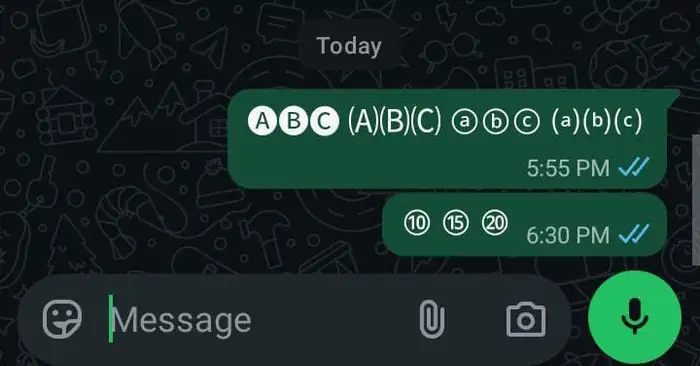
Four bubble styles rendered as monochrome letters in a WhatsApp chat.
Switch to the outlined circles first, since that solves it most of the time. If you need the filled look, keep it to one or two accent characters so a failure is cosmetic rather than total. Updating the device or the app helps, because font coverage ships with system updates. As a last resort, paste into a notes app first and check it there before it goes anywhere public.
People are not the only audience. Screen readers, search boxes and spellcheckers all handle these characters differently from plain letters, and the results are worth knowing before you style something important.
A screen reader reads what the character says it is, not what it looks like. Depending on the software, a circled A can be announced as circled latin capital letter A, or as A, or skipped entirely. A name written in twelve bubble letters can therefore be read out as twelve separate descriptions, which is exhausting for anyone relying on it. This is the strongest argument for using styled text as an accent rather than for a whole sentence.
Search is the second problem, and it is quieter. To a search box a circled word and a plain word are two unrelated strings, so a fully styled bio can be invisible to anyone looking for you by name. Spellcheck also gives up, since none of these characters are in any dictionary.
Three rules keep the look without shutting people out. Keep your real name in plain letters somewhere on the profile, even if the display name is styled. Never put essential information, like a booking link or a job title, in bubble characters alone. And keep styled runs short, because a decorated word reads as decoration while a decorated paragraph reads as a wall.
Plenty of bubble generators exist and most of them work. Here is what is different about this one.
The styles are separated honestly. Round bubbles live here and square letters live on the aesthetic page, rather than being mixed together to inflate a style count.
The gaps are labelled. Where an alphabet has no lowercase or no digits, this page says so instead of letting you discover it in a username field.
It runs in your browser. Text is converted on your device, so nothing is uploaded and no account is needed.
The compatibility advice is graded. Instead of claiming everything works everywhere, styles are ranked by how likely they are to render on someone else’s screen.
The limitation is stated plainly. We cannot guarantee how your text looks on a device we have never seen, because that depends on the font it has, not on this tool.
When you want a different look, you can see every style at the Fonti homepage.
Sweeten the tone with the cute font generator
Go tiny with the small text generator
Flip the whole thing with the upside down text generator
Style your digits with the number font generator
Box the letters with the aesthetic font generator
Yes. There is no charge, no signup and no limit on how many times you can use it.
No. Instagram usernames accept only letters, numbers, periods and underscores, so these characters are rejected. Put them in your display name instead, which has no such restriction.
Because the style you picked does not contain them. Filled circles and both square sets have capitals only, so any lowercase you typed passes through as capitals. Switch to the outlined circles if you need a full mix of cases.
Because their device has no font covering those characters. It is a display gap on their end, not damage to your text. Older phones and the newer filled styles are the usual combination behind it.
Depends on how. The characters themselves are part of Unicode and are not owned by anyone, so using them in a name or caption is fine. A logo is a different matter, because you would be depending on whatever font a viewer's device supplies, which is not something you can control or license.
Yes, but in one style only. The outlined circles have a full lowercase alphabet and the bracketed set has one too. No filled or squared style has lowercase anywhere in Unicode.
Yes. Styled characters are not matched against plain ones in search, so a fully styled name is effectively unsearchable. Keep your plain name visible somewhere on the profile.
Depends. Instagram counted ten filled circles as 10 of 150 in the bio. On Discord, 32 Bold Sans characters saved as 16 in both Display Name and Server Nickname, while Server Name and Channel Name kept all 32.
No. These are text characters at ordinary letter size, not outline drawings. You need a rounded font file set very large, or a printable sheet generator.
No. A font is a file that has to be installed and only works in apps that let you pick fonts. Bubble text is a set of characters that travels with the words wherever you paste them.