 Fonti
FontiYour Brand Name
Hello World
This cursive font generator turns your text into six cursive styles you can copy and paste straight into an Instagram bio, a TikTok display name, a Discord nickname, or a WhatsApp About line.
Style: Bold Script
Your Brand Name
Hello World
Hello World
Hello World
No favourites yet. Tap the star on a card to save it.
Nothing copied yet.
Nothing matches that search.
Numbers stay plain.
characters
Pick an alphabet, a separator and a decoration, then copy the result.
Live preview
0 units
𝓑𝓸𝓵𝓭 𝓢𝓬𝓻𝓲𝓹𝓽
Numbers stay plain.
𝒞𝓁𝒶𝓈𝓈𝒾𝒸 𝒮𝒸𝓇𝒾𝓅𝓉
Numbers stay plain.
𝑩𝒐𝒍𝒅 𝑰𝒕𝒂𝒍𝒊𝒄
Numbers stay plain.
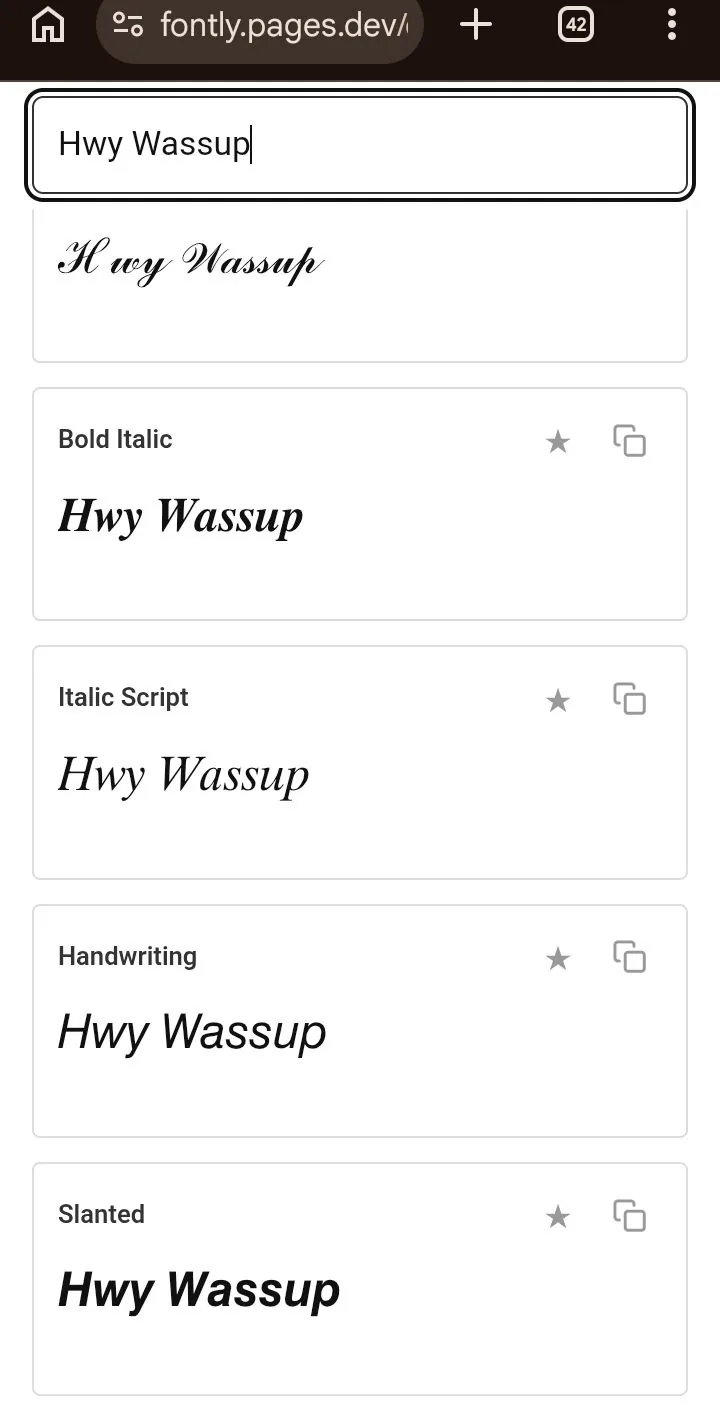
𝐼𝑡𝑎𝑙𝑖𝑐 𝑆𝑐𝑟𝑖𝑝𝑡
Numbers stay plain.
𝘏𝘢𝘯𝘥𝘸𝘳𝘪𝘵𝘪𝘯𝘨
Numbers stay plain.
𝙎𝙡𝙖𝙣𝙩𝙚𝙙
Numbers stay plain.
Marks added over your text, letters unchanged.
An alphabet wrapped in a decoration.
Decoration wrapped around your text, letters unchanged.
Decoration wrapped around your text, letters unchanged.
Decoration wrapped around your text, letters unchanged.
Decoration wrapped around your text, letters unchanged.
Decoration wrapped around your text, letters unchanged.
Decoration wrapped around your text, letters unchanged.
Type once and every style updates together, then tap any card to copy and paste cursive text wherever you need it. Cursive fonts here are free. There is no signup, and nothing gets installed on your phone or computer.
One thing worth understanding before you start: these are not fonts. They are Unicode characters that happen to look like joined-up handwriting, and that is exactly why they survive being pasted into apps with no font settings at all. It is also why a small number of places show them as empty boxes instead. The compatibility table further down this page names those places, so you can pick a style that holds up wherever you are putting it.
The whole thing takes about ten seconds. Every style on this page is cursive font copy and paste ready, so there is nothing to download and no setting to change first. The steps below include the two mobile quirks that trip people up most often.
Enter your name, bio line, or caption in the box at the top of this page. Every cursive style updates live as you type, so there is no generate button to press and nothing to wait for. Short text is easier to judge. Start with just the words you actually plan to use.
Scroll the cards and compare your own words rather than the sample text. Bold Script is the safest place to start. It is a complete alphabet, and it renders on more devices than the rest. If you are styling something permanent like a display name, stay with Bold Script or Bold Italic.
Each style has its own copy button, so one tap puts the whole line on your clipboard with spaces and punctuation intact. If you ever need to copy by hand on a phone, press and hold the text, drag the handles to cover the full line, then tap Copy. Missing the last character is the most common mistake here. Check the end of your selection.
Press and hold the field and tap Paste on mobile, or use Ctrl+V and Cmd+V on desktop. If the Instagram app refuses to paste, which it sometimes does, paste into your Notes app first and copy it again from there. That second copy fixes it almost every time. Cursive writing copy and paste behaves like ordinary text once it lands, so your spaces, punctuation and emoji all survive the trip.
Quick note before you commit to anything permanent: a handful of platforms strip or reject these characters, and the compatibility table below tells you which ones.
Nothing here is being installed and no font file is downloading to your device. The tool swaps each letter you type for a different letter that already exists in Unicode and happens to look cursive. Your regular “h” and the cursive 𝓱 are two separate characters with two separate ID numbers, in the same way that “h” and “n” are separate characters.
You will see this same tool called a cursive writer, a cursive typer, a cursive creator, a cursive word generator, a cursive letter generator or a cursive script generator, and search results treat all of those as one thing. They are. Whether a site brands itself a cursive fonts generator or simply lists fonts cursive style by style, the mechanism underneath is one lookup table swapping characters.
Mathematicians needed script letters to mean something different from regular ones inside equations, so Unicode added a set of styled alphabets for them in 2001. That set is called the Mathematical Alphanumeric Symbols block, and the script letters inside it are what every cursive generator on the internet is actually handing you. Nobody designed them for bios. They were built for algebra, and the internet borrowed them.
That history matters for one practical reason: characters built for equations were never tested against social media rules, character counters, or screen readers. Everything odd that cursive text does traces back to that mismatch. Our font generator homepage covers the full Unicode explanation if you want the longer version.
Unicode contains two true script alphabets, plus four italic alphabets that the whole internet sells as cursive. Six in total, not two hundred. Each one is a complete cursive writing fonts alphabet covering A to Z and a to z, which is why letters copy and paste cleanly out of every card below. When a generator advertises “200+ cursive styles,” it is counting these same six wrapped in different decorative symbols, so ✧𝓒𝓾𝓻𝓼𝓲𝓿𝓮✧ and ♡𝓒𝓾𝓻𝓼𝓲𝓿𝓮♡ get sold to you as two separate styles. Below are the six, labelled for what each one actually is.

Cursive styles, the six the generator actually ships
| Style | Sample | What it really is | Best for | Risk |
|---|---|---|---|---|
| Bold Script | 𝓒𝓾𝓻𝓼𝓲𝓿𝓮 | True script | Display names, bio headlines, anything permanent | Safe |
| Classic Script | 𝒞𝓊𝓇𝓈𝒾𝓋𝑒 | True script | Quotes, event lines, softer aesthetic posts | Uneven letter weight |
| Bold Italic | 𝑪𝒖𝒓𝒔𝒊𝒗𝒆 | Italic | Emphasis inside a caption or a sentence | Safe |
| Italic Script | 𝐶𝑢𝑟𝑠𝑖𝑣𝑒 | Italic | The most legible option at small sizes | Safe |
| Handwriting | 𝘊𝘶𝘳𝘴𝘪𝘷𝘦 | Sans italic | Casual captions, notes, personal messages | Check older devices |
| Slanted | 𝘾𝙪𝙧𝙨𝙞𝙫𝙚 | Sans italic | Gaming tags and usernames that allow Unicode | Check older devices |
That middle column is the part other generators leave out. Only Bold Script and Classic Script are genuinely script alphabets, drawn from handwriting. The other four are italics, which read as cursive at a glance and are perfectly usable, but they are slanted letterforms rather than joined ones. Those same four sit on the bold and italic text generator, sorted there by weight and slant instead of by how closely they resemble handwriting.
Bold Script has a second life you may already have run into. It is the same alphabet behind the 𝓯𝓻𝓮𝓪𝓴𝔂 text that spread out of a SpongeBob meme at the end of 2023, so the characters on the first card above and the ones filling TikTok comments are identical. That changes nothing about what you paste from here. If you arrived chasing that particular joke rather than the typography, the freaky font generator covers where the name came from and what the letters are really called.
Heads-up about Classic Script, because this quirk rarely gets explained anywhere. Unicode already had eleven of those script letters filed elsewhere, so it never duplicated them, and generators have to pull B, E, F, H, I, L, M, R, e, g and o from a different block called Letterlike Symbols. Those eleven characters come from a different part of your device’s font, so one letter in a Classic Script word sometimes sits at a slightly different weight than its neighbours. Nothing is broken when that happens, and you can see it for yourself in the table below.
One phrase, all six styles, so you can see what actually differs before you commit. “Hello Sarah” is a useful test because it has a capital, a repeated letter, an ascender and a descender. Those four things are exactly where cursive styles differ from one another.
| Style | Example | Safest for |
|---|---|---|
| Normal | Hello Sarah | Anything |
| Bold Script | 𝓗𝓮𝓵𝓵𝓸 𝓢𝓪𝓻𝓪𝓱 | Bios and display names |
| Classic Script | ℋℯ𝓁𝓁ℴ 𝒮𝒶𝓇𝒶𝒽 | Quotes and event lines |
| Bold Italic | 𝑯𝒆𝒍𝒍𝒐 𝑺𝒂𝒓𝒂𝒉 | Captions and emphasis |
| Italic Script | 𝐻𝑒𝑙𝑙𝑜 𝑆𝑎𝑟𝑎ℎ | Small text and long lines |
| Handwriting | 𝘏𝘦𝘭𝘭𝘰 𝘚𝘢𝘳𝘢𝘩 | Messages and notes |
| Slanted | 𝙃𝙚𝙡𝙡𝙤 𝙎𝙖𝙧𝙖𝙝 | Usernames and gaming tags |
Look closely at the Classic Script row. The H, the first e and the o are the substituted characters described above, and on most devices they sit slightly lighter than the letters around them. The Italic Script row does the same thing with its lowercase h. Copy any row straight from this table if you already know what you want.
Cursive text belongs anywhere the words are meant to be looked at rather than processed. That covers most of social media, and it stops at handles, forms, and anything a computer has to read back. The five cases below are where it earns its place.
Your bio and your display name both accept cursive, and the display name is where it looks best because it sits at the top of your profile in larger text. Style the name or one bio line. Leave the rest plain so the profile still reads quickly. Your @username will reject these characters outright, since Instagram only allows letters, numbers, periods and underscores there. Fair warning: styling the name field has a cost that has nothing to do with rendering, and the searchability section below explains it.
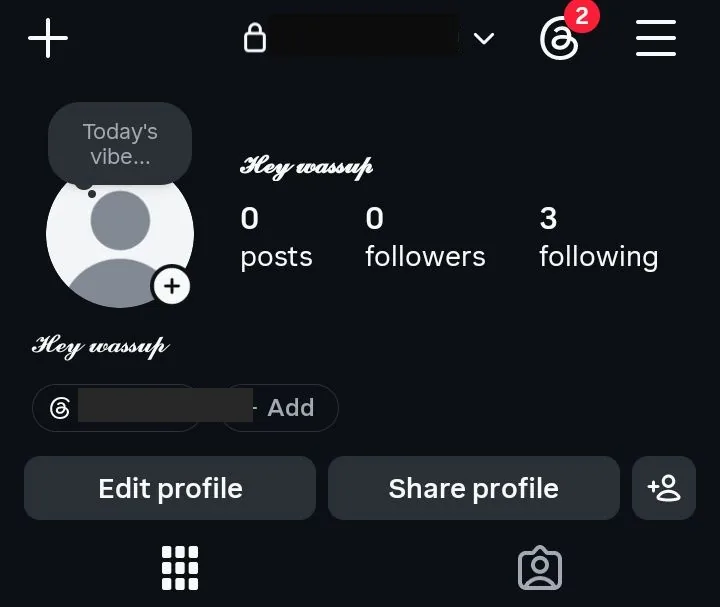
Instagram profile, cursive name saved in the name field and the bio
On both platforms the display name takes cursive and the handle does not. Discord replaced its old system in 2023, so your username is lowercase letters, numbers, underscores and periods only, while your display name accepts full Unicode. Worth checking on Discord: nicknames have a tight character ceiling, so paste your styled name in and confirm it saves before relying on it. The full walkthrough lives in our Discord Fonts guide.
Cursive works in messages, group names, and your About line, and the profile name field accepts it too. Inside a message, though, WhatsApp already has real formatting using asterisks and underscores, and that native option is more reliable and easier for screen readers. Use cursive for the profile name and the About line, and use WhatsApp’s own formatting inside conversations.
Digital invitations, RSVP messages, and event descriptions are a genuinely good fit, because the elegance does real work there and the text is only ever read on a screen. Classic Script and Bold Script both suit formal wording. Short phrases carry cursive best, so a welcome in cursive across an invitation header, or a happy birthday line on a digital card, works better than a full styled paragraph. For anything going to print, use a real cursive font file in your design tool instead, since printers work from font files and not from pasted characters.
A cursive name works well as an email sign-off, a portfolio footer, or a text watermark on your own work. It takes seconds and it needs no image editor. One limit to respect: a pasted cursive name is a decorative flourish and not a legal signature, so it will not stand in for one on a contract, a form, or anything official.
Most generator pages show a list of platforms with green ticks beside every one of them. That list is not accurate. The failures follow a pattern once you see them laid out. The table below gives a verdict per platform rather than a tick, along with the specific thing to watch for.
| Platform | Displays? | The catch to know |
|---|---|---|
| Yes | Bio, name and captions all fine. The @handle rejects it | |
| TikTok | Yes | Display name only. The handle is plain characters |
| Discord | Yes | Display names and messages work. Usernames must stay plain lowercase |
| X / Twitter | Yes | Each cursive letter costs two characters of your post limit |
| Yes | Older Android builds may show boxes for some styles | |
| Mostly | Posts and bios accept it. The legal name field does not | |
| Yes, but | Weakens how the platform reads your headline as keywords | |
| YouTube | Yes | Titles display fine but stop matching what people search for |
| Microsoft Word | Partly | Depends on the fonts installed on that machine. Some letters fall back to plain |
| Google Docs | Partly | Usually renders, with occasional fallback on the substituted script letters |
| Canva | Yes | Pastes as characters, so you cannot restyle it with Canva’s font picker |
| Gmail | Yes | Fine in the body. Avoid it in subject lines, where it reads as a spam signal |
The pattern is worth remembering, because it predicts every case that is not in the table. Anywhere text is simply displayed, cursive works. Anywhere text is processed, whether that is a search index, a username validator, a keyword parser or a legal name field, it either fails or costs you something. Good to know: when a platform refuses to save your styled name, that is a rule on their side and not a fault in the text.
A cursive letter is stored differently from a regular one, and some platforms count that against you. On X, the five letters of 𝓗𝓮𝓵𝓵𝓸 cost ten characters of your post limit instead of five, because X counts each of these characters twice. Discord does the same for display names: a 26 letter cursive name was trimmed to 16 letters, which is Discord’s 32 character ceiling at two units each. That result is from Discord alone. Where a field is tight, paste your text in and check it fits before saving.
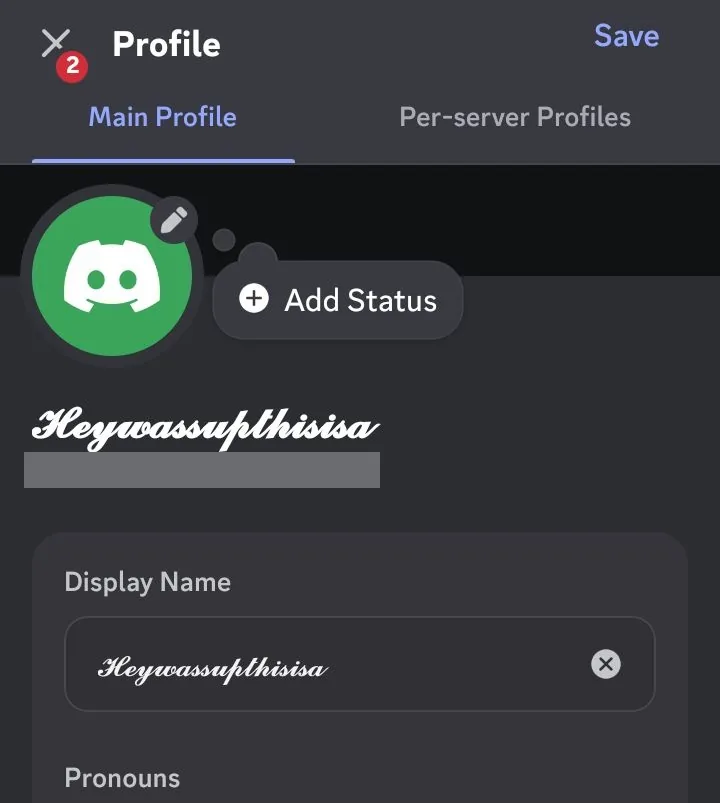
Discord count, a 26 letter cursive name saved as 16
One widely repeated claim on competing cursive pages says styled text never adds extra character count anywhere. That is wrong on X and on Discord. You discover it when a post refuses to send or a display name gets cut short. Budget for double on those fields, and wherever a limit is tight, paste your text in and check it fits before saving.
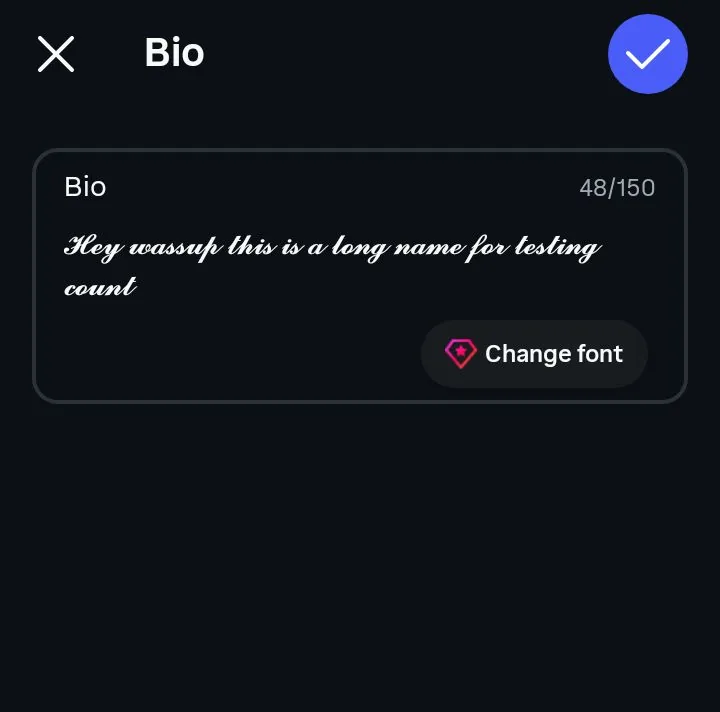
Instagram bio, cursive sentence saved at 48 of 150
Empty rectangles have a name among type designers, who call them tofu. They appear when the character reaches a device intact but that device has no drawing for it, so it paints a placeholder box instead. Nothing is broken or corrupted. The same line will look perfect on a newer phone.
With cursive specifically, the risk concentrates in three of the six styles. Handwriting and Slanted come from the sans-serif italic blocks, which tend to have thinner coverage on older devices, and Classic Script carries the eleven substituted letters that come from a separate part of the font. Bold Script, Bold Italic and Italic Script are the ones that hold up nearly everywhere. If your text turns into question marks rather than boxes, that is a different failure, and our homepage guide explains the distinction in full.
Handwriting and Slanted on a stock Android phone
Here is how the six sort by risk, so you can choose without testing every one of them.
Fixes, ordered by how often they actually work:
Cursive characters are not the letters people type into a search box. That can matter in more than one way, and most cursive pages skip the consequences.
The first is profile search. On Instagram, one account with a cursive name in the name field was still returned when another account searched the plain words hey wassup, and a styled query returned it too. That is one Instagram account and one query, not a rule for every platform. Keeping a plain name somewhere on the profile remains sensible advice if being found matters to you, because other apps may behave differently.
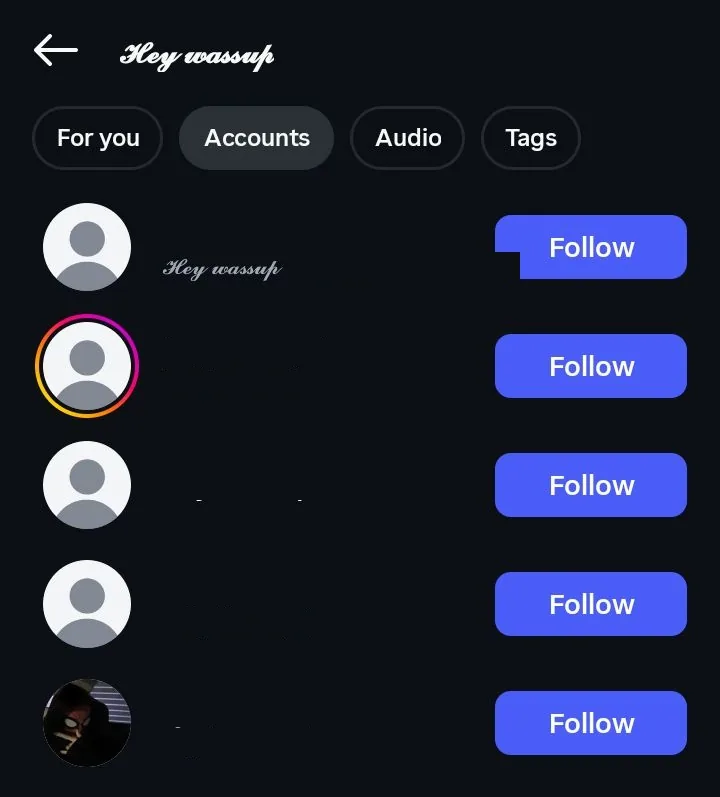
Instagram search, the cursive profile is still found
The second is Google. A cursive page title, heading, or image description will not rank for the words it appears to contain, so cursive belongs in decorative places and never in anything that needs to be indexed. The third is reputation: accessibility writers and spam filters both associate heavy Unicode styling with spam and scam accounts, so a fully styled message can read as less trustworthy rather than more.
The rule that comes out of all three is short. Style what is decorative, and keep plain text for anything that has to be searched, indexed, or trusted. In practice that means a styled display name is fine, as long as your real name sits somewhere plain on the same profile.
To a screen reader, cursive text is not a name or a word. It is a sequence of symbols, and each one gets announced by its technical Unicode name. Someone using VoiceOver or NVDA on 𝒽ℯ𝓁𝓁ℴ hears the letters spelled out one at a time as mathematical script characters, and in some setups hears nothing at all.
That affects blind and low-vision visitors, and it also affects voice assistants and automatic translation, both of which treat these characters as symbols rather than language. A profile written entirely in cursive is effectively blank to those users. Worth knowing: you do not have to give up the styling to fix this. Keep one plain-text version of anything that must be understood, which usually means your name, your contact line, and whatever you are asking people to do.
The script alphabet Unicode created covers letters only. There is no cursive 5 and no cursive 7, so numbers pass through this generator untouched and come out looking exactly as you typed them. A styled name followed by a plain birth year is not a mistake at your end, and no generator anywhere can fix it, because those characters were never created.
Styled number sets do exist in Unicode, just not cursive ones. Circled numbers like ①②③ and bold numbers live in different blocks, and our number font generator collects those. If you want a styled number sitting beside cursive text, take it from there. Paste the two together.
The styled alphabet Unicode created covers A to Z and a to z, and it stops there. There is no cursive version of á, é, ñ, ü or ç, so those letters fall back to their plain form and you end up with a word that is half styled. Words like café and señor show the problem immediately.
Entire writing systems are missing too. Urdu, Arabic, Hindi, Cyrillic, Chinese and Japanese have no styled equivalents in this block, so cursive generators cannot convert them at all. One catch worth planning around: if your bio mixes scripts, style only the Latin words and leave the rest plain, or transliterate an accented name into unaccented letters before converting it.
These three words get used interchangeably online, and they mean different things. Cursive is handwriting where the letters join up, developed for speed rather than decoration. Script is the typographic category for typefaces that imitate that look. Unicode itself uses that term. Calligraphy is decorative lettering made as an art form, usually by hand with a broad or pointed pen.
What you get from this page is script, and it is worth being precise about that. Generator sites and search results treat all three terms as synonyms. You will find the same six alphabets sold as cursive on one site and calligraphy on the next.
There is one real limitation hiding inside the naming confusion. Genuine cursive joins each letter to the next, but Unicode script characters are individual characters placed side by side, so they never actually connect. Look closely at 𝓒𝓾𝓻𝓼𝓲𝓿𝓮 and you will see small gaps where handwriting would have a continuous stroke. No generator can fix that, because connected letterforms need a real font file with joining rules built into it.
People arrive at pages like this one wanting three different things, and only one of them is solved by a generator. Picking the wrong route wastes real time, usually by downloading a font that then refuses to work in an app. The table below sorts out which one you actually need.
| What you want | What you need |
|---|---|
| Styled text to paste into a bio, chat, caption or username | This generator |
| Cursive type inside Photoshop, Canva, Word or a print design | A downloadable font file (.ttf or .otf) |
| To practise cursive handwriting on paper | A printable worksheet generator, not a text tool |
A font file changes how the same letters are drawn on one machine, so it works in design software and cannot work in someone else’s Instagram app. This page does the opposite. It changes which characters you are using, so the style travels anywhere text goes. Our homepage comparison breaks that difference down properly if you want the full version.
This deserves saying plainly, because a lot of people land here searching for cursive tattoo fonts and script fonts tattoo lettering. Pasted Unicode characters are the wrong tool for that job. A tattoo artist works from a stencil, which needs artwork at high resolution, and these characters cannot be scaled, recoloured, kerned or refined without falling apart.
What this page is genuinely good for is settling the wording. Type the phrase, compare it across the six styles, and see how the name reads before you commit to anything. Then take that phrase to a real font file. Free script and cursive font files suitable for tattoo lettering are available from Google Fonts, and your artist will very likely want to hand letter it regardless.
Vertical tattoo fonts are a separate problem again. Stacking pasted characters into a column depends entirely on the app you paste into rather than on the characters themselves. Build that layout in a design tool, then hand your artist the image rather than the text.
Names in cursive are the single most common reason people open a page like this one. Type just the name rather than a full sentence, then compare it across the six styles instead of trusting the sample text. Bold Script holds up best at small sizes because the thicker strokes survive being shrunk into a profile line. Classic Script looks more delicate. It suits quotes and invitations better than it suits a display name.
As a signature, cursive works well at the bottom of an email, on a portfolio page, or as a text watermark on your own work. It takes a few seconds and needs no design software, which is the whole appeal. Sites that brand themselves a cursive handwriting name generator, a calligraphy signature generator or a fancy signature generator all run on these same six alphabets, so there is nothing extra waiting for you elsewhere. Reality check: it carries no legal weight, so it cannot replace a signature on a contract, a form, or any official document.
A single styled capital is an underrated use. One cursive initial as a monogram, a drop cap, or a profile avatar letter gives you the effect without the readability cost of a fully styled name.
Match the style to the job. Most of the guesswork disappears. Use Bold Script for social bios and display names, since it stays legible at small sizes and renders on the widest range of devices. Use Bold Italic or Handwriting for personal messages and casual captions, with Bold Italic the safer of the two on unfamiliar devices. Save Classic Script for text that gets read slowly, like a quote card or an event line, where its uneven letter weight reads as character rather than error.
If you are choosing by mood rather than by job, here is roughly how the six line up against the words people search for. Bold Script is the thick, confident one. Classic Script is the elegant, beautiful, romantic pick, and the closest thing on this page to calligraphy styles. A different mood entirely, the wide and airy one built on spaced letters, sits outside all six of these, and the aesthetic font generator is the page for it.
Italic Script is the thin, simple, modern option that stays readable at any size. Handwriting and Slanted are where to look if you want different handwriting styles or cute handwritten fonts rather than something formal. Fancy cursive fonts, in the decorative sense, means one of these six wrapped in symbols. The decorated section under the tool handles those separately.
For logos and brand marks, skip this page and use a real font file. Pasted characters cannot be resized cleanly, recoloured, or kerned. A logo needs all three. Cursive text is fine for a temporary social header, but not for a permanent identity.
Plenty of cursive generators exist. Most of them hand you the same six alphabets this one does. That is less a criticism of them than a fact about Unicode, which only ever created six. What differs is how much of the truth a page tells you, so here is the case for this one, drawback included.
The tool stays at the top of this page whenever you want to go back to it. Type your name once and all six styles appear together. Take whichever one holds up where you are pasting it.
A character converter, not a font installer. It swaps each letter you type for a Unicode character that looks like joined-up handwriting, so nothing downloads and nothing gets installed. That is why the output pastes into apps with no font settings at all.
Yes, completely. Cursive fonts free of charge is the whole model here, because Unicode characters are part of a public standard rather than licensed software. There is nothing to buy and no account to create.
Yes. There is no copyright on the characters themselves, so you can use cursive text in business bios, product listings, and marketing posts. For an actual logo, use a licensed font file instead.
Through the bio or name field, never the username. Type your text above, tap copy on the style you want, then open Instagram, go to Edit Profile and paste it in. If the app refuses to paste, paste into your Notes app first and copy it again from there.
Missing font coverage on the device reading it, not a problem with your text. That device has no drawing for those characters, so it paints placeholder boxes called tofu. Switching to Bold Script or Bold Italic fixes it in almost every case.
Yes, in display names and messages on both. Neither platform allows it in the handle or username, and Discord nicknames have a character limit that cursive uses up faster than plain text.
Partly. It usually displays, but the result depends on which fonts are installed on that machine, so some letters can fall back to their plain form.
Yes, and this is the cost most pages leave out. Search boxes compare plain letters, so a fully styled name may not match when someone searches for you. Keep your real name in plain text somewhere on the profile.
Not as words. A screen reader spells the characters out individually using their technical names, and in some setups reads nothing at all. Keep anything essential in plain text so it stays readable for everyone.
On some platforms, yes. On X, a five-letter cursive word costs ten characters of your limit. Discord's display name does the same: a 26 letter cursive name was trimmed to 16, which is the 32 character ceiling at two units each. Paste your text into any tight field and check it fits.
No. Unicode's script alphabet covers letters only, so 0 to 9 come out plain whichever style you pick. Circled and bold number sets do exist in other Unicode blocks.
Not in the way most people mean it. No system keyboard types true cursive, because these are characters rather than a font your keyboard could apply. Saving your styled name as a text replacement shortcut does work.
Only for choosing the wording. Pasted characters cannot be scaled or refined the way stencil artwork needs, so take your phrase to a real script font file or let your artist hand letter it.
Yes, for decorative signatures in emails, portfolios, and digital cards. It is not a legal signature and will not stand in for one on contracts or official forms.
With a keyboard shortcut. Save the cursive characters as a text replacement on iPhone or Android, so a short trigger expands into your styled name automatically.
Only in unaccented Latin letters. Accented letters stay plain, and Urdu, Arabic, Hindi, Cyrillic, Chinese and Japanese have no cursive equivalents in Unicode at all.