 Fonti
FontiYour Brand Name
Hello World
Discord fonts are not fonts you install. They are Unicode characters that already sit on every phone and computer, shaped to look like bold, script, gothic or bubble letters. Type your name into the generator above, pick a style, then paste it into your display name, your server nickname, your bio or a message.
Style: Bold Script
Your Brand Name
Hello World
Hello World
Hello World
No favourites yet. Tap the star on a card to save it.
Nothing copied yet.
Nothing matches that search.
Numbers stay plain.
characters
Pick an alphabet, a separator and a decoration, then copy the result.
Live preview
0 units
𝓑𝓸𝓵𝓭 𝓢𝓬𝓻𝓲𝓹𝓽
Numbers stay plain.
𝑩𝒐𝒍𝒅 𝑰𝒕𝒂𝒍𝒊𝒄
Numbers stay plain.
𝙎𝙡𝙖𝙣𝙩𝙚𝙙
Numbers stay plain.
𝐁𝐨𝐥𝐝
𝗕𝗼𝗹𝗱 𝗦𝗮𝗻𝘀
𝕭𝖔𝖑𝖉 𝕱𝖗𝖆𝖐𝖙𝖚𝖗
Numbers stay plain.
ꜱᴍᴀʟʟ ᴄᴀᴘꜱ
Numbers stay plain.
Unicode has no small-capital X, so x stays plain. This site ships no small-capital Q, so q stays plain. Capitals and lowercase both appear as small capitals.
ˢᵘᵖᵉʳˢᶜʳⁱᵖᵗ
Unicode has no superscript q, so q stays plain. Raised letters are lowercase forms, so capitals are not preserved.
ₛᵤbₛcᵣᵢₚₜ
Nine letters have no subscript form in Unicode, so b, c, d, f, g, q, w, y and z stay plain. Lowered letters are lowercase forms, so capitals are not preserved.
Ⓒⓘⓡⓒⓛⓔⓓ
Unicode records the circled capital M at U+24C2 as an emoji character.
𝙼𝚘𝚗𝚘𝚜𝚙𝚊𝚌𝚎
𝔻𝕠𝕦𝕓𝕝𝕖-𝕤𝕥𝕣𝕦𝕔𝕜
Fullwidth
Vaporwave Greek
Vaporwave Triangle
S p a c e d O u t
Numbers stay plain.
Letters stay plain. The style is a space between each character.
🅂🅀🅄🄰🅁🄴🄳
Numbers stay plain.
Unicode's squared letters are capitals only, so lowercase letters appear as squared capitals.
Marks added over your text, letters unchanged.
An alphabet wrapped in a decoration.
Decoration wrapped around your text, letters unchanged.
Decoration wrapped around your text, letters unchanged.
Decoration wrapped around your text, letters unchanged.
Decoration wrapped around your text, letters unchanged.
Decoration wrapped around your text, letters unchanged.
Decoration wrapped around your text, letters unchanged.
Three separate systems style text on Discord, and mixing them up is the reason most people think their font is broken. Markdown works in messages and nowhere else. Unicode works almost everywhere and costs nothing. Nitro’s Display Name Styles are Discord’s own fonts, and they carry a limitation that most guides leave out. This page covers all three, plus the exact character limit on every field you can paste into.
The tool sits at the top of this page and takes about fifteen seconds to use. There is no account, no download and no bot to add to your server. Type, pick, copy, paste.
Type your name or message into the box. Every style below updates as you type, so there is no generate button to press. If you are styling a display name, type it exactly as you want it including spaces, because the space between two styled words stays an ordinary space and will not be converted.
Scroll to the style you want. Styles are named for what they actually are, so Bold Script is Bold Script and Small Caps is Small Caps. No invented category names. The note column in the next section records a Unicode fact for each row, not a guess about screens.
Tap or click the style to copy it. The whole line copies at once. On a phone, use the copy button rather than selecting the text by hand, because a manual selection often drops the first or last character and you end up pasting a broken word.
Paste it into Discord. Long-press and choose Paste on a phone, or paste from the keyboard on a computer. Which field you paste into decides whether it works at all, and the field-by-field section further down covers every one of them.
Nothing you type leaves your device. The conversion runs in your browser. The one thing worth doing before you save anything permanent is reading the note column below.
Every style below is real Unicode, so it needs no Nitro. Here is how the word Wumpus looks in the styles people actually use on Discord.
| Style | Wumpus | Best for | Note |
|---|---|---|---|
| Bold Sans | 𝗪𝘂𝗺𝗽𝘂𝘀 | Display names, category headers | Mathematical Alphanumeric Symbols. Letters and digits sit in that one block. |
| Small Caps | ᴡᴜᴍᴘᴜꜱ | Nicknames, role names | Unicode has no small-capital X, so x stays plain. This site ships no small-capital Q, so q stays plain. Capitals and lowercase both appear as small capitals. |
| Bold Script | 𝓦𝓾𝓶𝓹𝓾𝓼 | Aesthetic and art servers | Mathematical Alphanumeric Symbols. Every letter sits in that one block. |
| Monospace | 𝚆𝚞𝚖𝚙𝚞𝚜 | Developer servers, rules lists | Mathematical Alphanumeric Symbols. Letters and digits sit in that one block. |
| Fullwidth | Wumpus | Server names, spacing out short words | Halfwidth and Fullwidth Forms. Letters and digits sit in that one block. |
| Double-struck | 𝕎𝕦𝕞𝕡𝕦𝕤 | Bios, status lines | Mathematical Alphanumeric Symbols, with C, H, N, P, Q, R and Z taken from Letterlike Symbols. |
| Circled | Ⓦⓤⓜⓟⓤⓢ | Voice channel names | Unicode records the circled capital M at U+24C2 as an emoji character, so some apps draw it as a coloured symbol instead of a letter. |
| Fraktur | 𝔚𝔲𝔪𝔭𝔲𝔰 | Role-play and fantasy servers | Mathematical Alphanumeric Symbols, with C, H, I, R and Z taken from Letterlike Symbols. |
| Superscript | ʷᵘᵐᵖᵘˢ | Subtle role labels | Unicode has no superscript q, so q stays plain. Raised letters are lowercase forms, so capitals are not preserved. |
| Squared | 🅆🅄🄼🄿🅄🅂 | One-word tags | Unicode’s squared letters are capitals only, so lowercase letters appear as squared capitals. |
Discord passes these characters through. A missing glyph on a given screen is a font-coverage gap, not a Discord reject.
Paste your chosen style into a direct message to yourself and open that message on a second screen before you save the name anywhere public.
Lean medieval with the gothic font generator if Fraktur is the look you are after across Discord and elsewhere.
In 2001, Unicode 3.1 added a block called Mathematical Alphanumeric Symbols. The purpose was narrow and academic: mathematicians needed 𝐴, 𝒜 and 𝔄 to mean three different variables in plain text, so Unicode encoded bold, italic, script, fraktur, double-struck and monospace versions of the Latin alphabet as separate characters. Nobody involved was thinking about usernames.
Those characters are what every Discord font generator serves you. When you paste 𝓦𝓾𝓶𝓹𝓾𝓼 into your display name, Discord is not applying a font. It is storing six characters that happen to be shaped like a script W, u, m, p, u and s. The concept worth naming here is borrowed alphabets: letters lifted out of maths notation and enclosed-symbol blocks.
That single fact explains almost everything else on this page. It explains why the styles survive a copy and paste into Instagram or a text message. It explains why no server admin can switch them off. And it explains the one honest cost.
One limitation: a screen reader does not see a stylish W. It reads the underlying character name. A script name can be announced as a string of maths symbols, or skipped entirely. If accessibility matters in your community, Small Caps and Bold Sans are the two styles whose letter shapes stay closest to plain text.
Discord has three ways to change how text looks, and they overlap almost nowhere. Most confusion about Discord fonts comes from applying one system’s rules to another.
| Markdown | Unicode styles | Nitro Display Name Styles | |
|---|---|---|---|
| What it really is | Formatting codes Discord reads | Different characters | Discord’s own fonts |
| Cost | Free | Free | Nitro only |
| Works in messages | Yes | Yes | No |
| Works in display name | No | Yes | Yes |
| Works in server, channel, role names | No | Yes | No |
| Works in your bio | Partly | Yes | No |
| Survives copy and paste | No | Yes | No |
| Anyone can turn it off | No | No | Yes |
| Screen-reader friendly | Yes | Poorly | Yes |
Read that table bottom-up and the strategy picks itself. Markdown is the right tool for emphasis inside a message, because Discord renders it natively and it costs nothing in readability. Unicode is the right tool for anything permanent, because it is the only system that reaches server names, channel names and role names at all.
Nitro’s Display Name Styles look like the premium option and in one narrow way they are, since they are true fonts rather than substituted characters. They reach display-name fields, including per-server profiles. They vanish the moment anyone copies your name, and the person reading your name can disable them. The section below covers that properly.
This changes your name everywhere at once, in every server and every DM.
A server nickname overrides your display name in that server only, which makes it the safer place to experiment.
Saved, and visible to everyone else in the member list. Discord draws member names in a heavy weight anyway, so the shape proves nothing on its own; what it shows is that the field kept the pasted characters.
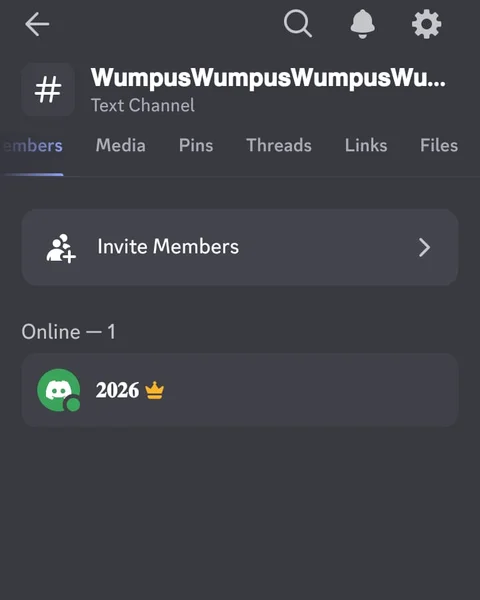
A styled server nickname in the Discord member list.
Check before you save: long-press the field and use Paste rather than typing, because phone keyboards will not reproduce these characters and autocorrect sometimes strips them mid-edit.
Each Discord text field has its own character ceiling and its own rules. This is the table nobody publishes. It settles most arguments about whether a font is broken.
| Field | Character limit | Unicode | Markdown |
|---|---|---|---|
| Username (@handle) | 2 to 32 | No | No |
| Display name | 32 | Yes | No |
| Server nickname | 32, per server | Yes | No |
| About Me / bio | 190 | Yes | Partly |
| Server name | 100 | Yes | No |
| Role name | 100 | Yes | No |
| Channel name | 100, forced lowercase | Yes | No |
| Message | 2,000 free, 4,000 with Nitro | Yes | Yes |
The username row is the one that catches everyone. Since Discord retired the four-digit discriminator, your @handle accepts lowercase a to z, the digits 0 to 9, an underscore and a full stop. Nothing else. It will not take a styled character, an uppercase letter, a space or an emoji, and it rejects two full stops in a row. Several well-ranked font generator pages state the opposite, which is worth knowing before you spend an hour trying to make it work.
The display name is where the styling belongs, and at 32 characters it is tighter than it looks. Fullwidth and Squared styles eat that budget fast. On 15 September 2026 the 32-letter string WumpusWumpusWumpusWumpusWumpusWu was pasted into Discord’s Android app: as plain letters it saved in full in the Display Name field, and in Bold Sans it saved only the first sixteen. Server Nickname behaved the same, while Channel Name and Server Name kept all thirty-two styled characters. src/data/styles.ts sets bold-sans uppercaseBase at 0x1D5D4 and lowercaseBase at 0x1D5EE, both above U+FFFF, so each styled letter costs two UTF-16 units. The same question sits over TikTok.
Channel names have their own quirk. Discord forces them to lowercase and replaces spaces with hyphens, but the lowercasing only reaches letters that have a lowercase mapping. Discord’s own API documentation puts it as: if there is a lowercase variant of any letters used, you must use those, and characters with no lowercase variants are still allowed. Styled capitals do have styled lowercase counterparts as characters — src/data/styles.ts sets bold-sans uppercaseBase at 0x1D5D4 and lowercaseBase at 0x1D5EE — but Unicode defines no case relationship between those two runs, so Discord has nothing to apply and the capitals stay. That is why 𝖙𝖆𝖛𝖊𝖗𝖓 survives as a channel name while Tavern becomes tavern.
Plain letters do not survive the paste. TestChannel became testchannel in the Create Channel dialog itself, before the channel existed.
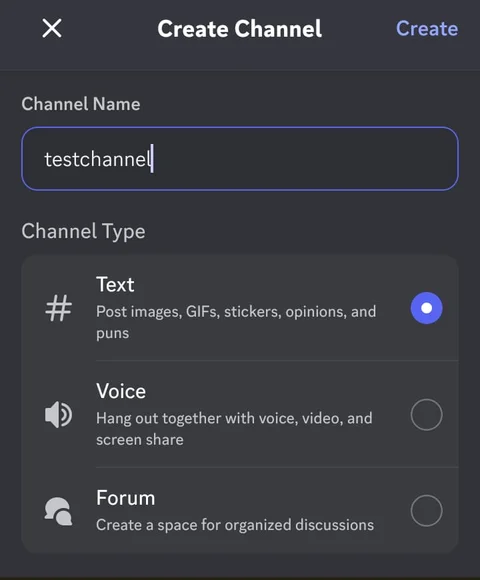
Discord reduced the plain channel name to lowercase in the Create Channel dialog.
The same dialog and the same paste action with a Bold Sans name, which is the style this was tested with rather than the Fraktur above. The capitals came through untouched.
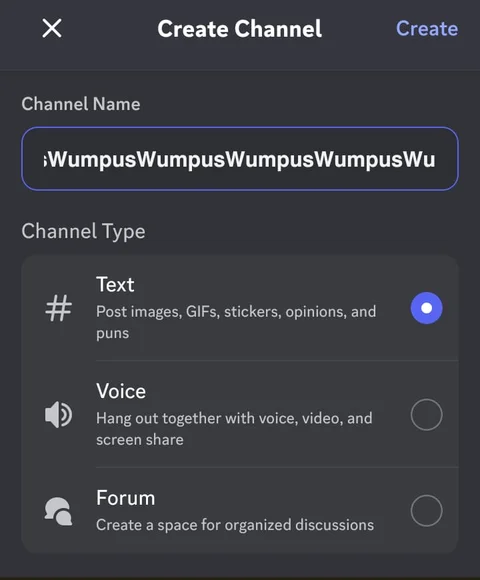
The styled channel name kept its capital forms in the Create Channel dialog.
If the account is unverified, Discord’s New Usernames and Display Names help page says a random five digits are appended to the username seven days after creation. That has nothing to do with fonts. It is the second most common reason a handle suddenly looks wrong.
Discord’s Display Name Styles FAQ describes Display Name Styles as a Nitro feature that changes the typeface, colour and animation of a display name. Discord renders them as real fonts rather than faking them with substituted characters.
This matters for one reason. Almost every Discord fonts page still online, including several that rank on the first page, opens by telling you Discord does not offer fonts. That was true. It is not true now, and the honest version of the answer is more useful than the outdated one.
Discord’s help page currently lists these fonts: gg sans, which is the default, plus Tempo, Sakura, Jellybean, Modern, Medieval, 8Bit, Vampyre, Monkey Bars, Mainframe, Headbang and Journal. On top of those sit these effects: Solid, Gradient, Neon, Toon, Pop, Gummy and Prism.
Saving a style needs Nitro. Discord’s help page says users without Nitro can preview Display Name Styles on mobile and desktop but cannot save the style to their profiles.
On mobile the fonts, colours and effects still show, but they are static, without animation. Inside a server only the font shows. The server role colour or enhanced role style replaces the colour and the effect.
A style can be set on a per-server profile, so Display Name Styles reach display-name fields, including per-server profiles. They do not reach usernames, server names, channel names, role names or the About Me field.
This is the single most common complaint about the feature, and the answer is a definition rather than a fix. Display Name Styles apply to your display name. They never touch your @handle, because the handle is a system identifier restricted to lowercase letters, digits, underscores and full stops.
So if you bought Nitro expecting a styled @name, no amount of settings will produce one. Nothing will, from Discord or from any generator. The handle is the one field on the platform that no styling method reaches.
The profile editor shows the same boundary: the display name carries the styled characters, and the handle row underneath stays plain text.
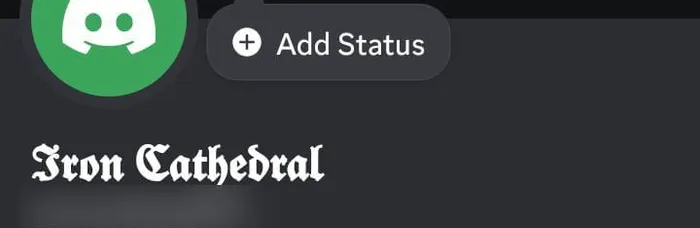
A styled Discord display name above a plain username.
Here is the part that decides the whole comparison. It is rarely covered anywhere.
Any Discord user, Nitro or not, can turn Display Name Styles off for themselves in User Settings, then Accessibility. Once they do, your paid font renders as plain gg sans on their screen.
Unicode has no equivalent switch. There is no accessibility toggle, no server setting and no client option that reverts styled characters to plain letters, because they are not a style. They are the text itself. A free Unicode name is, in the narrow sense of being unremovable, more permanent than a paid one.
A styled name has one job beyond looking good: people still need to find you. Discord’s mention autocomplete matches the characters in your name. A fully styled name means nobody can type @ and reach you without copying and pasting first.
The practical middle ground is Small Caps or Bold Sans. Both stay visually distinct, both keep letter shapes close enough to plain text that people can guess at them, and both sit comfortably inside the 32-character display name limit.
Clan tags work best when the whole roster shares one style. A member list reading 𝗪𝘂𝗺𝗽𝘂𝘀, 𝗖𝗹𝘆, 𝗡𝗼𝘃𝗮 does more for a team’s identity than any single elaborate name. Bracket the tag rather than the name. [𝗪𝗠𝗣] Wumpus stays taggable while the tag still reads as a unit.
The practical warning is that several games reject Unicode outright. Discord will accept anything, but if you use the same tag in Roblox, Minecraft or PUBG on PC, plain characters are the only ones that survive every filter.
Art servers, study groups and music communities lean the other way. Bold Script, Small Caps and Superscript read as calm rather than loud, and they pair naturally with a single small symbol rather than a full frame. Fullwidth reaches the same mood through spacing rather than letterform, which is why it shows up so often in soft server names. Anyone chasing that look specifically should start at the aesthetic font generator, where the wide styles are laid out with what each one costs against a 32-character name.
Worth flagging: styled names are not universally liked. A recurring sentiment in Discord communities is that heavily decorated names read as low effort, with Small Caps the one style people consistently exempt. If your server is one where that view is common, a light touch outperforms a maximal one.
Keep it soft with the cute font generator, or flow it out with the cursive font generator for a longer script name.
Server-side styling is a different problem from personal styling. Your name has to be recognisable. Your server has to be navigable, and those goals pull in opposite directions.
The rule that holds up across every well-run server is contrast, not decoration. Style the layer above and leave the layer below plain. Bold category headers with plain channels underneath reads clean. Bold categories with styled channels reads as noise.
Category names are the one place where heavy styling reliably earns its space, because they are structural rather than clickable. A bracketed bold header stands apart from the channels it contains:
【 𝐆𝐄𝐍𝐄𝐑𝐀𝐋 】 with plain general, rules and introductions beneath it
【 𝐆𝐀𝐌𝐈𝐍𝐆 】 with plain valorant and apex-legends beneath it
Two things break here. Long names can be cut short in the sidebar, and styled characters are visually wider than plain ones, so a header that fits on a large screen can arrive cut off on a small one. Check the result at the size it will appear before you commit.
Role names accept full Unicode up to 100 characters, which makes them a low-stakes place to try a style. A role can be renamed without disrupting anything.
Small Caps works particularly well for role hierarchies, because it stays legible at the small size the member list uses.
The same display name set in Fraktur and again in Bold Fraktur, at the size the member list uses: the regular cut keeps thin strokes, the bold cut draws the same letters much heavier.
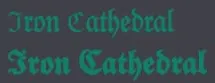
Fraktur and bold Fraktur display names at Discord member-list size.
Channel names carry a cost the limits table above does not show. A styled channel name cannot be typed from memory. Nobody can reach it through the quick switcher. Style the category and leave the channel itself searchable, or you trade navigation for decoration.
Both channels in the sidebar afterwards. The plain name sits in lowercase, the styled one keeps its capitals, and neither was edited after creation.
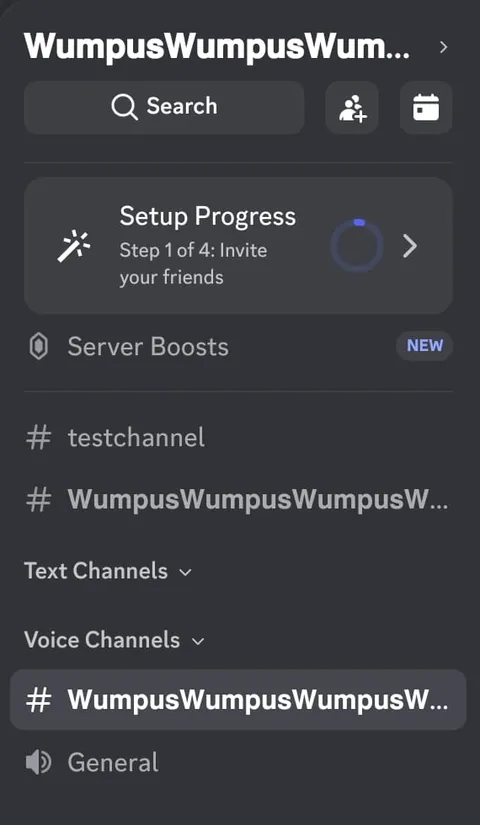
A plain lowercase channel name beside a styled channel name that kept its capital forms.
Symbols are a separate system from styled letters. A decoration is a standalone character that sits beside your text rather than replacing it, which means it never interferes with whether your name is taggable.
Two distinct patterns dominate Discord, and they are not interchangeable.
Frames wrap a name in matching brackets or ornaments. They come from ornamental Unicode blocks and Japanese punctuation, and they are what most people mean by a decorated Discord name.
| Frame | Example | Source |
|---|---|---|
| Ornaments | ꧁ Wumpus ꧂ | decorations.ts ornaments, prefix U+A9C1, suffix U+A9C2 |
| Japanese brackets | 【 Wumpus 】 | decorations.ts brackets, prefix U+3010, suffix U+3011 |
| Corner quotes | 『 Wumpus 』 | decorations.ts corner-quotes, prefix U+300E, suffix U+300F |
| Hollow Sparkle | ✧ Wumpus ✧ | decorations.ts sparkles, prefix U+2727, suffix U+2727 |
| Stars | ★ Wumpus ★ | decorations.ts stars, prefix U+2605, suffix U+2605 |
Frames cost characters. A matching pair plus a space on each side consumes four of the 32, which is a real constraint on a longer name.
Dividers do a different job. They separate and indent channel names so a long list reads as a structure rather than a wall. The characters people actually use are narrow: ┃, ‧, |, ┆, ╭┈➤ and ╰┈➤ for nested items, and rows of ═ or ┴ as horizontal rules inside category names.
A divider placed before the channel name keeps the emoji and the word aligned down the sidebar, which is most of why well-organised servers look organised.
Inside a message you have both systems available, and markdown is usually the better one. It is native, it renders identically for everyone, and screen readers handle it correctly.
| Syntax | Result |
|---|---|
| **text** | Bold |
| *text* or _text_ | Italic |
| __text__ | Underline |
| ~~text~~ | Strikethrough |
| ***text*** | Bold italic |
| ||text|| | Spoiler, hidden until clicked |
| # ## ### | Large, middle-size and small headers |
| -# | Subtext, the small grey line |
| > | Blockquote |
Discord’s Commands, Shortcuts and Navigation Guide maps Ctrl+B or Cmd+B to bold and Ctrl+I or Cmd+I to italic.
These two questions come up constantly. Both have a native answer. A line beginning with # and a space becomes a large header. A line beginning with -# and a space becomes subtext, rendered small and grey.
Both apply to the entire line. You cannot shrink three words in the middle of a sentence, which is the honest limitation behind every guide promising inline small text. The advice circulating on forums that << produces small text, or that spoiler tags shrink text, is simply wrong. Spoilers hide text at normal size, and inline code is monospace rather than smaller.
Unicode bold and markdown bold are independent, so they stack. Generate 𝗪𝗨𝗠𝗣𝗨𝗦 above, paste it into a message, then wrap it: **𝗪𝗨𝗠𝗣𝗨𝗦**. Discord bolds characters that are already bold, and the result is heavier than either method alone. Useful for a pinned announcement header, and worth rationing everywhere else.
Three markdown rules that trip people up: the space after # is mandatory or the line stays plain, a backslash makes the next character literal, and backticks must be the innermost wrapper, so **`code`** works while the reverse does not.
Empty rectangles, sometimes called tofu, mean one thing: the font on that screen has no glyph for that character. The text arrived intact. The renderer had nothing to draw with, which is why the same name can look finished on one screen and broken on another.
The pattern tells you the cause. If it breaks on one screen but not others, it is that font stack. If it breaks for everyone, the style uses characters from a rare block and the fix is to pick a different style rather than to debug anything.
Squared letters sit in the Enclosed Alphanumeric Supplement, a block many fonts cover incompletely. Circled capital M is an emoji character at U+24C2. Bold Sans, Small Caps and Bold Script draw from blocks with broader coverage, which is a Unicode fact rather than a device test.
Styled text is not against the rules. Unicode characters are standard text, Discord stores them without complaint, and no part of the Terms of Service prohibits them. Styling on its own is not what gets accounts actioned.
What the rules do cover is what you use the styling for. Discord’s Community Guidelines apply to usernames and display names equally, and four uses reliably cause problems.
| Practice | Status |
|---|---|
| Styled letters in any allowed field | Fine |
| Impersonating Discord, staff or system messages | Prohibited |
| Impersonating another person, group or organisation | Prohibited |
| Using lookalike characters to evade a word filter | Enforced by servers, often with an immediate ban |
| Names built from invisible characters | Rejected, and treated as evasion |
The filter-evasion point deserves emphasis because it is easy to do accidentally. Automod and moderation bots match plain text. A word written in styled characters is a different string, so it slips past. Moderators know this, and a name or message that looks like deliberate evasion is treated as evasion regardless of intent.
One practical habit: keep your plain name written down somewhere. If you ever need to appeal, verify an account or be found by a moderator, the styled version is difficult for anyone to type.
No. Every Unicode style on this page is standard text rather than a Discord feature, so a free account can use it. Nitro's Display Name Styles are a separate paid feature that applies to display-name fields, including per-server profiles.
No. Your @handle accepts lowercase a to z, digits, underscores and full stops only. No generator and no Nitro subscription changes that. Style your display name instead.
Empty rectangles mean the font on that screen has no drawing for the character. The text arrived intact. Squared letters sit in the Enclosed Alphanumeric Supplement; Circled capital M is recorded by Unicode as an emoji character.
No, not for the styling itself. You can be actioned for what the styling is used for, specifically impersonation or evading a word filter.
Mention autocomplete matches the actual characters, so a fully styled name is hard to tag and hard to search. Moderation bots see the styled string, not the plain word behind it.
Start the line with -# followed by a space. That renders the whole line as small grey subtext. There is no way to shrink part of a line.
Start the line with # and a space for the largest header, ## for the middle size and ### for small. The space is required.
Yes, inside a code block using ansi colour codes. It only works in messages. This page has not tested where that rendering holds.
gg sans. Discord moved to it in 2022, replacing Ginto, which had itself replaced Whitney. Pages still naming Ginto as the current font are out of date.
The Unicode characters themselves do not change between Discord's apps. What varies is whether a given screen has a glyph for every character in the style you picked.
Depends which font. Discord's Display Name Styles FAQ says any viewer can disable Display Name Styles for themselves under Settings, then Accessibility. Unicode styles cannot be disabled by anyone, because they are the text itself.
Partly, and it is a bad idea. Discord requires visible characters and rejects names built entirely from blank space, and moderators treat near-invisible names as evasion.